WI Freecam 1.1
2026-03-22
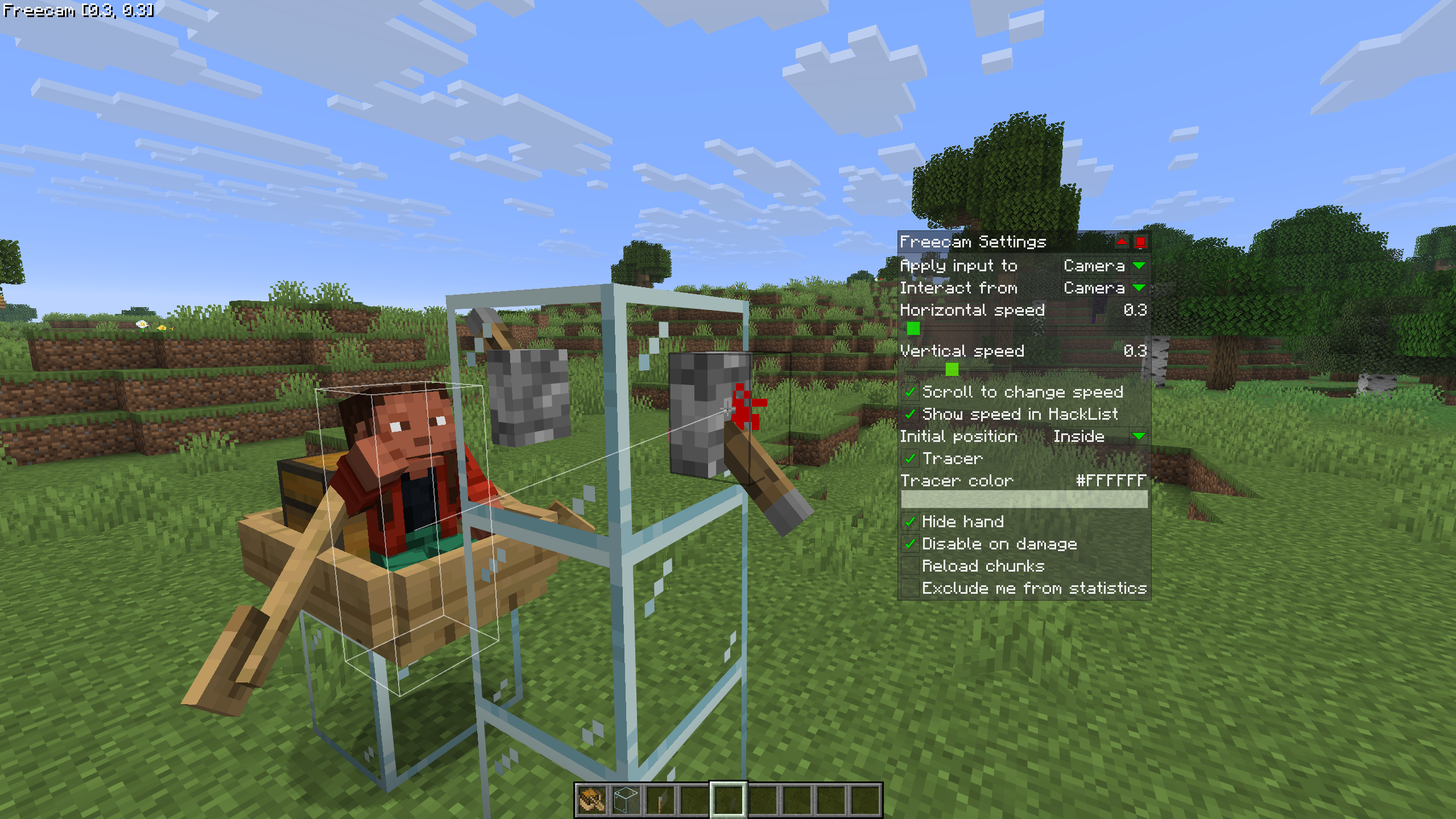
This version of WI Freecam is available for Minecraft 26.2, 26.1.2, 26.1.1, 26.1 and 1.21.11, as well as 21 different snapshots ranging from 26.2-rc-2 to 26.1-rc-2.
Changelog
-
Added an “Interact from” setting. When changed to “Camera”, this allows you to interact with blocks and entities from the camera like Freecam did in older versions of Wurst. (#1300 (Wurst), /d/1491, /d/1505)
-
Added a “Reload chunks” checkbox to Freecam. Turning this off improves performance but can cause visual holes in the world. (#6)
-
Fixed Freecam affecting vehicles in Camera input mode. (#4)
-
Fixed some chunks being invisible while using Freecam with Sodium installed. (/d/1502)
-
Changed
SectionOcclusionGraphMixinto use@WrapOperationinstead of@Redirectfor better compatibility with other mods. No specific compatibility issues found, just making sure WI Freecam follows best practices. -
Further improved the automated test system.
Downloads
for Minecraft 26.2 + Fabric
IMPORTANT: You are currently viewing WI Freecam 1.1, which is an older version for Minecraft 26.2 + Fabric. For optimal performance and the latest features, we recommend downloading WI Freecam 1.1.3 MC26.2 instead.
WI Freecam v1.1 MC26.2
File: WI-Freecam-1.1-MC26.2.jar
 Fabric API MC26.2
v0.152.1+26.2
Fabric API MC26.2
v0.152.1+26.2
Mirrors:
 CurseForge
Additional files:
for Minecraft 26.1.2 + Fabric
IMPORTANT: You are currently viewing WI Freecam 1.1, which is an older version for Minecraft 26.1.2 + Fabric. For optimal performance and the latest features, we recommend downloading WI Freecam 1.1.3 MC26.1.2 instead.
WI Freecam v1.1 MC26.1.2
File: WI-Freecam-1.1-MC26.1.2.jar
Fabric API MC26.1.2
v0.145.4+26.1.2
Mirrors:
Additional files:
for Minecraft 26.1.1 + Fabric
WI Freecam v1.1 MC26.1.1
File: WI-Freecam-1.1-MC26.1.1.jar
Fabric API MC26.1.1
v0.145.1+26.1
Mirrors:
Additional files:
for Minecraft 26.1 + Fabric
WI Freecam v1.1 MC26.1
File: WI-Freecam-1.1-MC26.1.jar
Fabric API MC26.1
v0.144.0+26.1
Mirrors:
Additional files:
for Minecraft 1.21.11 + Fabric
IMPORTANT: You are currently viewing WI Freecam 1.1, which is an older version for Minecraft 1.21.11 + Fabric. For optimal performance and the latest features, we recommend downloading WI Freecam 1.1.3 MC1.21.11 instead.
WI Freecam v1.1 MC1.21.11
File: WI-Freecam-1.1-MC1.21.11.jar
Fabric API MC1.21.11
v0.141.3+1.21.11
Mirrors:
Additional files:
for Minecraft Snapshots
26.2-rc-2 (click to expand)
WI Freecam v1.1 MC26.2-rc-2
File: WI-Freecam-1.1-MC26.2-rc-2.jar
Fabric API MC26.2-rc-2
v0.152.0+26.2
Mirrors:
Additional files:
26.2-rc-1 (click to expand)
WI Freecam v1.1 MC26.2-rc-1
File: WI-Freecam-1.1-MC26.2-rc-1.jar
Fabric API MC26.2-rc-1
v0.152.0+26.2
Mirrors:
Additional files:
26.2-pre-6 (click to expand)
WI Freecam v1.1 MC26.2-pre-6
File: WI-Freecam-1.1-MC26.2-pre-6.jar
Fabric API MC26.2-pre-6
v0.152.0+26.2
Mirrors:
Additional files:
26.2-pre-5 (click to expand)
WI Freecam v1.1 MC26.2-pre-5
File: WI-Freecam-1.1-MC26.2-pre-5.jar
Fabric API MC26.2-pre-5
v0.151.0+26.2
Mirrors:
Additional files:
26.2-pre-4 (click to expand)
WI Freecam v1.1 MC26.2-pre-4
File: WI-Freecam-1.1-MC26.2-pre-4.jar
Fabric API MC26.2-pre-4
v0.150.3+26.2
Mirrors:
Additional files:
26.2-pre-3 (click to expand)
WI Freecam v1.1 MC26.2-pre-3
File: WI-Freecam-1.1-MC26.2-pre-3.jar
Fabric API MC26.2-pre-3
v0.150.2+26.2
Mirrors:
Additional files:
26.2-pre-2 (click to expand)
WI Freecam v1.1 MC26.2-pre-2
File: WI-Freecam-1.1-MC26.2-pre-2.jar
Fabric API MC26.2-pre-2
v0.150.1+26.2
Mirrors:
Additional files:
26.2-pre-1 (click to expand)
WI Freecam v1.1 MC26.2-pre-1
File: WI-Freecam-1.1-MC26.2-pre-1.jar
Fabric API MC26.2-pre-1
v0.149.2+26.2
Mirrors:
Additional files:
26.2-snapshot-8 (click to expand)
WI Freecam v1.1 MC26.2-snapshot-8
File: WI-Freecam-1.1-MC26.2-snapshot-8.jar
Fabric API MC26.2-snapshot-8
v0.149.1+26.2
Mirrors:
Additional files:
26.2-snapshot-7 (click to expand)
WI Freecam v1.1 MC26.2-snapshot-7
File: WI-Freecam-1.1-MC26.2-snapshot-7.jar
Fabric API MC26.2-snapshot-7
v0.148.3+26.2
Mirrors:
Additional files:
26.2-snapshot-6 (click to expand)
WI Freecam v1.1 MC26.2-snapshot-6
File: WI-Freecam-1.1-MC26.2-snapshot-6.jar
Fabric API MC26.2-snapshot-6
v0.148.1+26.2
Mirrors:
Additional files:
26.2-snapshot-5 (click to expand)
WI Freecam v1.1 MC26.2-snapshot-5
File: WI-Freecam-1.1-MC26.2-snapshot-5.jar
Fabric API MC26.2-snapshot-5
v0.147.1+26.2
Mirrors:
Additional files:
26.2-snapshot-4 (click to expand)
WI Freecam v1.1 MC26.2-snapshot-4
File: WI-Freecam-1.1-MC26.2-snapshot-4.jar
Fabric API MC26.2-snapshot-4
v0.146.2+26.2
Mirrors:
Additional files:
26.2-snapshot-3 (click to expand)
WI Freecam v1.1 MC26.2-snapshot-3
File: WI-Freecam-1.1-MC26.2-snapshot-3.jar
Fabric API MC26.2-snapshot-3
v0.145.6+26.2
Mirrors:
Additional files:
26.2-snapshot-2 (click to expand)
WI Freecam v1.1 MC26.2-snapshot-2
File: WI-Freecam-1.1-MC26.2-snapshot-2.jar
Fabric API MC26.2-snapshot-2
v0.145.5+26.2
Mirrors:
Additional files:
26.1.2-rc-1 (click to expand)
WI Freecam v1.1 MC26.1.2-rc-1
File: WI-Freecam-1.1-MC26.1.2-rc-1.jar
Fabric API MC26.1.2-rc-1
v0.145.4+26.1.2
Mirrors:
Additional files:
26.2-snapshot-1 (click to expand)
WI Freecam v1.1 MC26.2-snapshot-1
File: WI-Freecam-1.1-MC26.2-snapshot-1.jar
Fabric API MC26.2-snapshot-1
v0.145.4+26.2
Mirrors:
Additional files:
26w14a (click to expand)
WI Freecam v1.1 MC26w14a
File: WI-Freecam-1.1-MC26w14a.jar
Fabric API MC26w14a
v0.145.2+26w14a
Mirrors:
Additional files:
26.1.1-rc-1 (click to expand)
WI Freecam v1.1 MC26.1.1-rc-1
File: WI-Freecam-1.1-MC26.1.1-rc-1.jar
Fabric API MC26.1.1-rc-1
v0.144.4+26.1
Mirrors:
Additional files:
26.1-rc-3 (click to expand)
WI Freecam v1.1 MC26.1-rc-3
File: WI-Freecam-1.1-MC26.1-rc-3.jar
Fabric API MC26.1-rc-3
v0.144.0+26.1
Mirrors:
Additional files:
26.1-rc-2 (click to expand)
WI Freecam v1.1 MC26.1-rc-2
File: WI-Freecam-1.1-MC26.1-rc-2.jar
Fabric API MC26.1-rc-2
v0.144.0+26.1
Mirrors:
Additional files:
Installation
WI Freecam can be installed just like any other Minecraft mod.
Important: Always make sure that your modloader and all of your mods are made for the same Minecraft version. Your game will crash if you mix different versions.
Installation using Fabric
Install Fabric Loader.
Add Fabric API to your mods folder.
Add WI Freecam to your mods folder.